Figma's Native AI Agents: Redefining Collaborative Design with Autonomous Assistance
Introduction
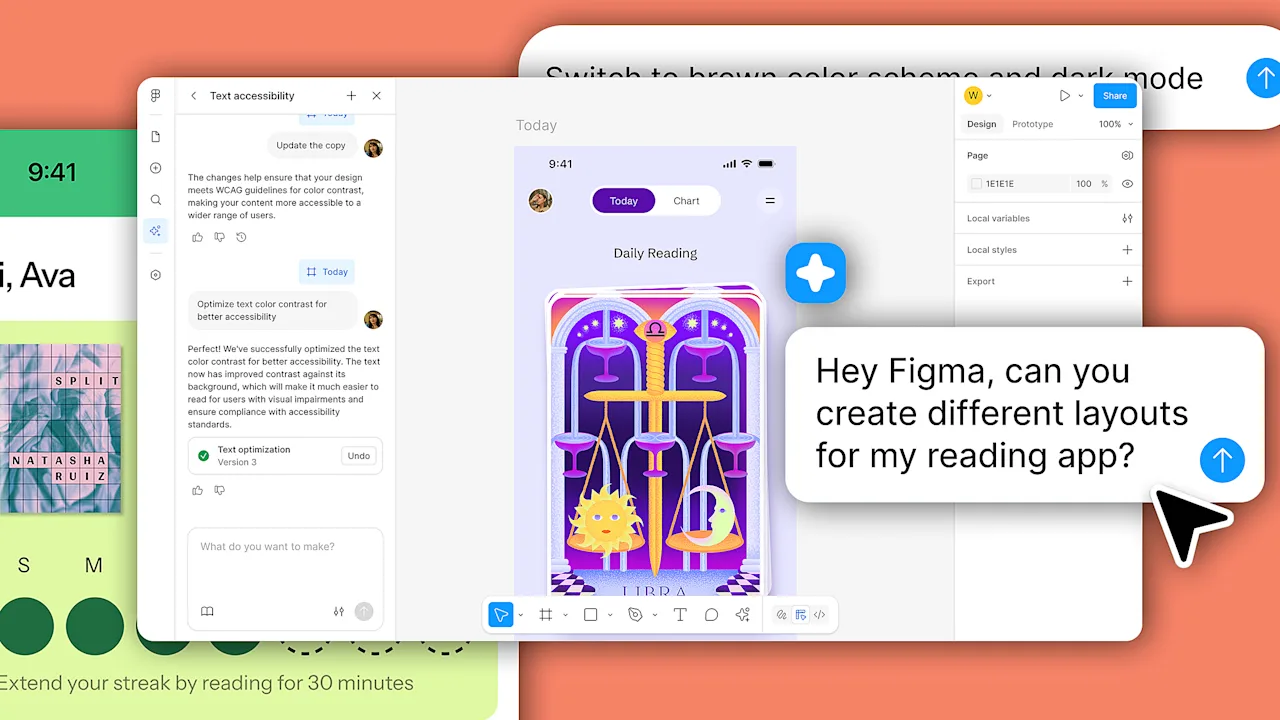
Figma has unveiled a groundbreaking AI agent built directly within its collaborative design environment. This isn't just another external tool with a chatbot interface; it's a set of digital assistants that live on your drafting board in Figma Design. The goal is to automate the tedious aspects of UI creation while keeping designers in the flow. More importantly, it opens the door for team members from marketing, engineering, and project management to actively participate in the design process, reshaping who gets to be a creator.
How Figma’s AI Agents Work
Figma’s agentic system is powered by a proprietary set of algorithms trained specifically on UI architecture and the platform’s own design frameworks. This allows the AI to bridge the gap between a vague idea and a functional prototype with remarkable precision.
Embedded Natural Language Interface
Unlike other AI UX tools that force you to work in a separate chat window, Figma’s agents are deeply integrated into the canvas. When you select an app screen, a star icon appears, signaling that you can adjust its visuals using natural language. Simply tell the agent what you want, and it modifies the interface element directly. This seamless interaction keeps you focused on your design rather than on managing the tool.
Granular Control and Bulk Operations
The AI offers both micro and macro control. You can tweak individual elements—right down to a single radio button or icon—by describing the change. But it also handles bulk operations effortlessly. For example, you can ask the agent to change the spacing in a progress bar across all instances in your app, or globally alter color palettes on one element, one screen, or the entire project. It takes care of the mindless pixel-pushing so you can focus on the creative decisions.
Multiple Agents and Context Awareness
Teams can deploy several AI agents at once, each controlled by different users, all working collaboratively alongside human colleagues. Crucially, the AI continuously references your existing design system logic and even the ongoing conversations happening on the canvas. This context awareness means it adapts to your team’s style and decisions, and you can toggle between typing commands and manually manipulating the design without losing the thread.
The Promise and Peril of Design Democratization
This tool is a double-edged sword. It promises to save time for seasoned designers and empower non-designers to create, but it also carries risks.
Boon for Seasoned Designers
For experienced designers, the agent eliminates repetitive tasks like formatting components or exploring multiple visual directions. It acts like an ultra-fast coworker who can generate initial layers, iterate on palettes, and handle bulk changes. This frees up cognitive bandwith for higher-level problem solving and creative exploration.
Empowering Non-Designers
By embedding natural language controls and autonomous agents, Figma makes design accessible to anyone with a clear vision, regardless of their technical skills. A marketing manager can tweak a landing page, a developer can prototype an interaction, and a project supervisor can explore layout options—all without needing to become a design tool expert. This democratization can lead to brilliant ideas being executed directly by the people who understand the user best.
The Quality Tradeoff
However, the same ease of use that empowers creatives can also lead to a flood of mediocre designs. Much like generative video tools, handing AI design capabilities to those without a trained eye may result in interfaces that are functional but lack polish, consistency, or aesthetic appeal. The risk is a fast track to visual clutter and diluted brand identity. Teams will need to establish guardrails and review processes to ensure that the agents augment rather than undermine quality.
Conclusion
Figma’s native AI agents represent a significant leap forward in collaborative design. By embedding autonomous helpers directly into the environment, they reduce drudgery, accelerate iteration, and broaden participation. Yet the democratization of design comes with a responsibility to maintain standards. As with any powerful tool, the key lies in how teams choose to use it—whether as a force for creative expansion or a source of noisy, low-quality output. The future of design will be shaped by those who can harness these agents wisely.
Related Articles
- Axios NPM Package Breach: A Step-by-Step Guide to the UNC1069 Supply Chain Attack
- 10 Essential Facts About the MSI MAG MT201W Heavy-Duty Monitor Arm
- Unlocking the Past: How Genetic Genealogy Identified Franklin Expedition Sailors
- AI Agent Design: Experts Warn Against Premature Multi-Agent Systems
- Bartender Pro Turns Your Mac's Notch into a Dynamic Command Center
- Housing Market Power Shift Stalls: State-by-State Inventory Divide Widens
- How to Spot and Prevent Fabricated Citations in Your Research Papers
- Mastering AD CS Privilege Escalation: From Template Attacks to Shadow Credentials